Steal the EQ Curve Behind Every Hit Vocal
Most good sounding vocals all fall within the same vocal curve. So why not steal if for yourself?
Key Takeaways
- Hit vocals share one EQ shape - low-mid presence, controlled sub, and way more high-end shine than your mic gives you
- Leave a slight dip around 5kHz - it's harsh, sibilant, and singers rarely produce it naturally
- Genre barely changes the curve - hip hop, R&B, rock, country and electronic all land in the same range
- Match the curve by ear first, then use tools like magic.CURVE to get there in seconds
- Use curve matching as ear training - learn what a finished vocal tone actually sounds like
I analyzed 3,054 vocals from Billboard hit songs and squeezed them all into a single EQ curve.
Then I built a plugin around it that listens to your vocal, figures out its tone, and reshapes it to match the hits automatically.
But before I show you the plugin - I want to show you the curve itself. Because once you see it, you can steal it manually in whatever EQ you already own.
I also made a full video on this…
All the ideas in this article come from the video below. If you don't feel like reading, well, I gotchu.
No purchase required. Just knowledge.
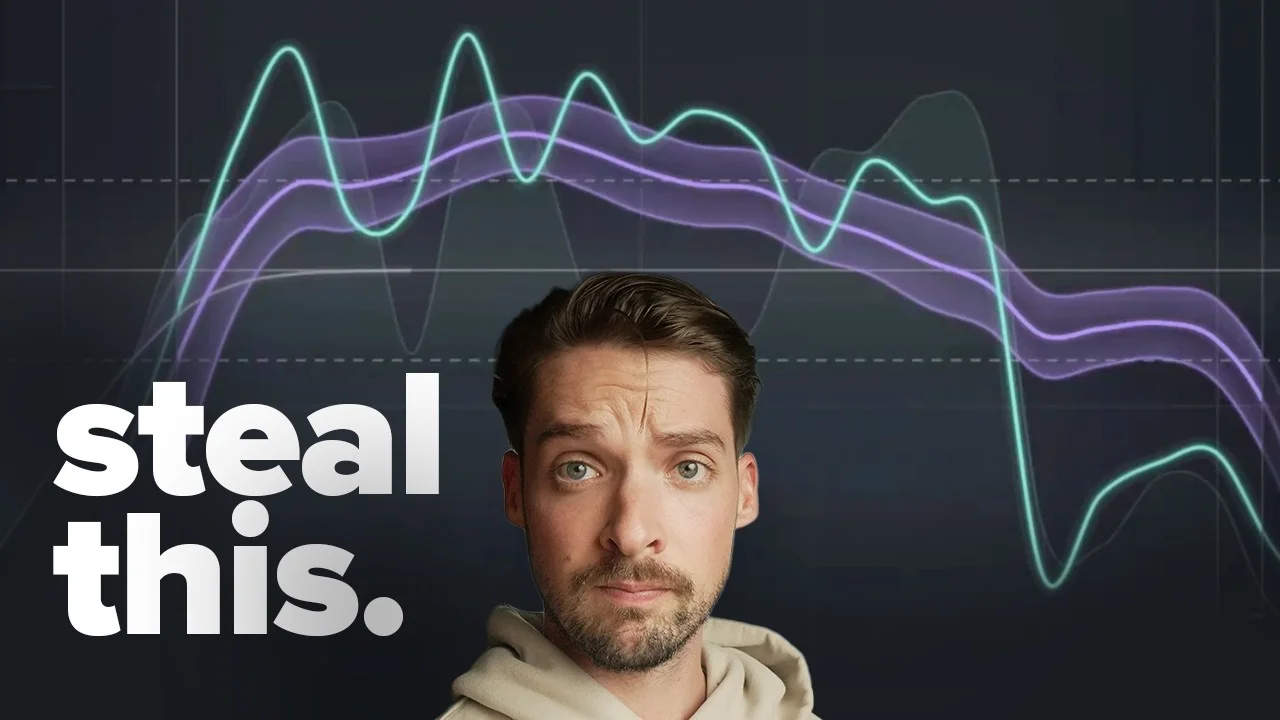
The Curve Behind Basically Every Hit Vocal
Here’s the setup: I pulled the average vocal EQ from over three thousand charting songs and plotted them all on one graph.
Each song is a single spaghetti line. Click one, and you can see what that vocal’s EQ looks like across the entire track.
Then you turn them all on at once - every genre, every song - and something wild happens.
They all clump together.
Not loosely. Tightly. There’s a clear, repeatable shape that good-sounding vocals fall into, and it barely moves no matter what kind of music you’re making.
What the shape actually looks like
Three things stand out immediately:
The low-mids sit higher than the sub. Hit vocals aren’t bass-heavy. There’s body and warmth in that low-mid region, but the very bottom end drops off. Your vocal doesn’t need sub content - the kick and 808 own that real estate.
There’s way more high-end shine than your microphone gives you. This is the big one. Compare a hit vocal’s top end to what your mic captures raw and it’s not close. Finished vocals are bright. Air, sparkle, presence - it’s all there, and it’s a lot more than most people are comfortable dialing in.
There’s a strange dip around 5kHz. This one surprised me at first, but it makes total sense once you think about it.
Why 5kHz dips
Two reasons.
Anatomically, that region is harder for singers to reproduce. It’s just not where the human voice naturally has a ton of energy.
And you don’t want to boost it anyway - that’s prime sibilance and harshness territory. Push 5kHz and you get spitty S sounds, ear fatigue, and that “why does this vocal hurt?” feeling.
So the average of three thousand hit songs shows a slight scoop there. Which means every mix engineer in the world independently arrived at the same conclusion: leave that spot alone.
Takeaway: warmth in the low-mids, a tuck around 5k, and more top end than you think. That’s the shape.
Genre Matters Way Less Than You Think
I fully expected hip hop and country to look completely different.
They don’t.
Hip hop, R&B, rock, country, electronic - all pretty much land in the same exact range. There are small differences (which is why I built genre-specific curves into the plugin), but the overall shape is shockingly consistent across the board.
Which tells you something important: there isn’t a “pop vocal EQ” and a “rap vocal EQ.” There’s a good vocal EQ. Genre nudges it. It doesn’t reinvent it.
If you’ve been avoiding brightness on your rap vocals because you think rap vocals should be dark - the data says otherwise.
Steal It Manually First (For Free)
You don’t need to buy anything to use this.
I built a free Vocal Analyzer where you can drop in your own vocal and see exactly how it compares to the hit curve. You can also look up specific artists and compare against them directly.
Here’s the manual workflow:
- Run your vocal through the analyzer. See where your tone sits versus the target curve.
- Note the gaps. Too much sub? Not enough air? Bump at 5k?
- Open your EQ and correct toward the curve - gently. Broad shelves and wide bells, not surgical notches.
- A/B constantly. The curve is a target, not a law. Your ears still get the final vote.
That’s it. That’s the entire technique. You can do it in stock EQ today.
But doing it by hand on twenty vocals in a session gets old fast. Which is why I built the plugin.
magic.CURVE: The Automated Version
magic.CURVE does the analysis and the matching in real time.
You drop it on your vocal chain. You hit play. The EQ below immediately starts moving, reshaping itself based on the actual signal coming in.
That’s the part that makes it different from a static preset - it adjusts to whatever part you’re singing. You can watch the green background spectrum shift as the performance changes, and the EQ tracks right along with it.
The controls that actually matter
Amount. Defaults to 50%, which I find is the sweet spot. Crank it higher and you’ll see the EQ moves get much more aggressive. This is the one knob I touch on almost every vocal - load it up, adjust amount until it sounds good, move on.
Freeze. If you like where the curve has landed and you don’t want it moving anymore, hit freeze. It locks in like a normal static EQ and you go about your day. Great for printing consistent tone across a whole section.
Curve selection. This is the biggest change you can make. You get:
- Country
- Hip hop
- Electronic
- Latin
- Pop
- Low voices
- Medium voices
- High voices
The voice-type options are underrated. If you’re a mid-range singer, picking “medium voices” will often get you a curve that nearly matches your raw tone already - meaning the plugin barely has to do anything, which is exactly what you want.
The match readout (top right). It tells you how far off the target you are in decibels. On my voice with a medium curve, I was sitting at 2.9 dB off the line, which is pretty good. It also shows you how many vocals that particular curve was built from - the medium voice curve came from 412 voices.
Low and high pass filters. These let you restrict the correction to only part of the spectrum. Want it fixing only your high end and leaving the low-mids exactly as you recorded them? Easy. This opens up some genuinely creative uses beyond straight tone matching.
Fit controls. You can cap how much the plugin cuts and how much it boosts independently. Only want up to 9 dB of cut? Done. Only want up to 9 dB of boost? Also done. Useful if you trust your low end but want help up top.
Presets and documentation. There are presets up top, and a question mark button that pulls up the full documentation if you want to go deeper.
Honestly though - the default settings are the ones I use most often. Load it, set amount, done.
How It Sounds on Real Voices
I tested it on three completely different sources.
My voice. The before and after on “all my friends and comrades underwater” was immediate - more clarity, more forward presence, less of that boxy raw-mic feeling.
A female vocalist. A subscriber sent me a project and I isolated her vocal. Raw, it was fine. With magic.CURVE on, it was already sounding way better - opened up, more finished, more like it belonged on a record.
Rap vocals. I loaded up a rap verse and picked the hip hop curve. This one was not a drastic change - and that’s actually the most interesting result of the three.
Why? Because the original recording was already close to the curve. Someone had already dialed in a good vocal tone.
Which brings me to the thing I care about most.
The Real Benefit: Ear Training
A tool like this teaches you what a properly mixed vocal is supposed to sound like.
You hear the before. You hear the after. Your brain starts logging the difference.
After a few sessions, you’ll start reaching for your regular EQ and instinctively dialing in that shape yourself - more air, controlled sub, tucked 5k - because you finally know what the target sounds like.
That’s the skill. The plugin just gets you there faster while you build it.
If you want more structure around your vocal chain while you’re at it, grab the free Vocal Production Checklist or the 10 free vocal presets to see how the tone stage fits into everything else.
Get magic.CURVE
magic.CURVE is live today.
For the next 7 days only, it’s at its founding price of $39 instead of the regular $59. That’s 34% off.
And if you download it and don’t like it for any reason, I’ll refund you every dollar - and you keep the plugin. That’s how confident I am that this changes your workflow.
This is the tool I wish I’d had when I started mixing vocals 12 years ago. I spent years guessing at what “bright enough” meant, boosting the wrong frequencies, and wondering why my vocals sounded homemade next to the songs I loved.
Turns out the answer was sitting in 3,054 hit songs the whole time.
Now it’s a curve. And now it’s yours.
Want a professional starting point? My Vocal Magic presets give you ready-made vocal chains for any genre - EQ, compression, reverb, and more, all dialed in and ready to go.
Or grab my free vocal presets to try before you buy.
About Mattie
Mattie is a music producer, songwriter, and educator specializing in Logic Pro and vocal production. With over 10 years of experience in the music industry, he's helped thousands of artists transform their home studio recordings into professional-quality tracks.
As the founder of Music By Mattie, he creates tutorials, presets, and courses that simplify complex production techniques. His mission is to make professional music production accessible to everyone, regardless of budget or experience level.