magic.METER free hit vocal analyzer
Your vocal vs. the hits
A free plugin that grades your vocal against 3,054 hit song vocals, live in your DAW, and tells you what to fix first.
Free Mac: AU / VST3 / AAX Windows: VST3 / AAX Never changes your audio
What it compares you to
 2005001k2k5k10k
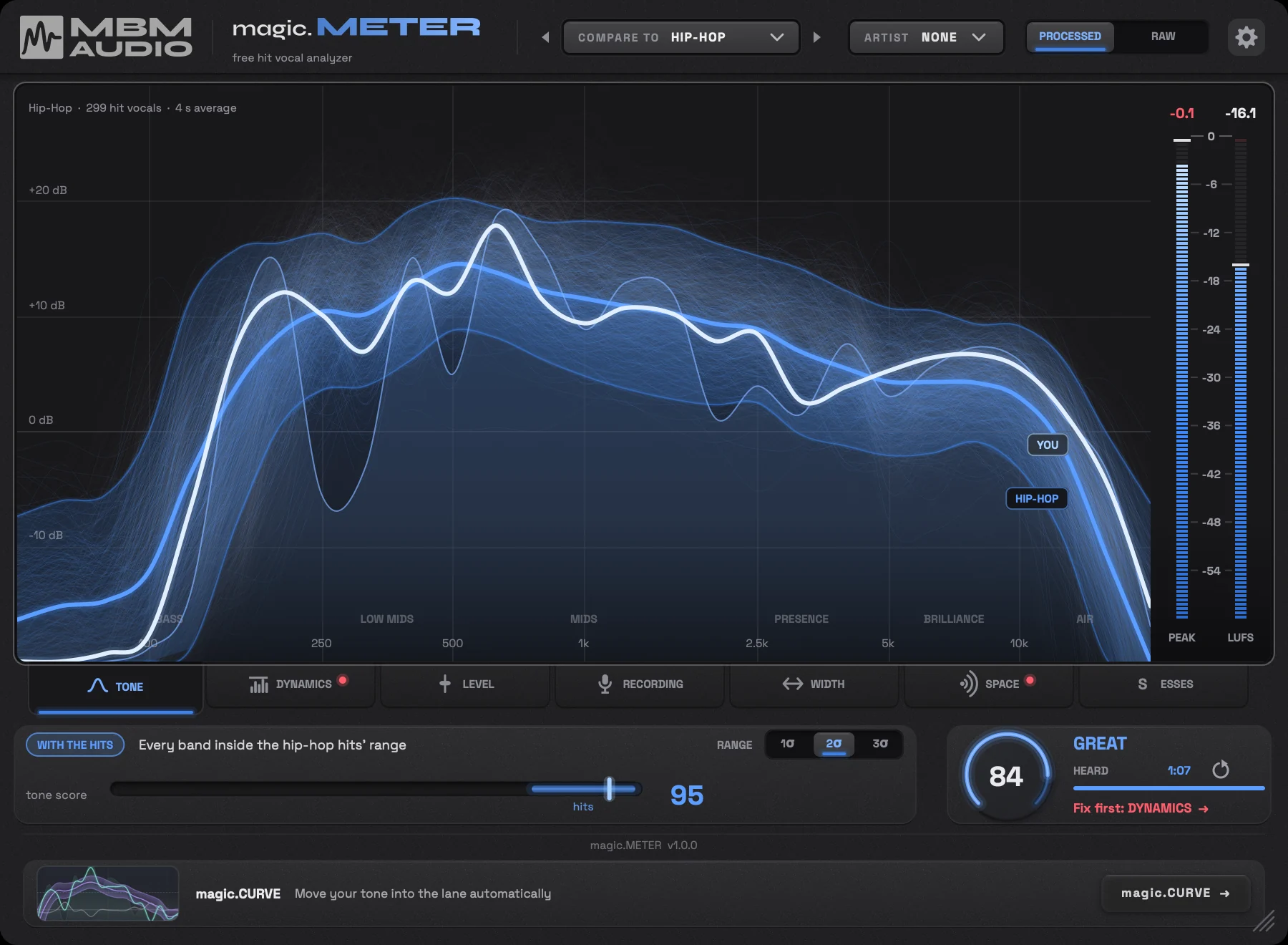
 3,054 hit song vocals, measured one by one. Every line is one of them; the white line is the middle. A typical hit vocal scores 90 in magic.METER (they land 80-100), hit compression lands around 16.3 dB, and about a minute of singing gets you a full read.
Seven tabs. One move each.
Each tab grades one part of your vocal against the hits. When something's off, you get the move, with the amount.
TONE
Your EQ curve against the curves of the hits you compare to.
Compare to
16groups of hits
All Hits, or one of 9 genres: Pop, Hip-Hop, R&B, Country, Latin, Rock, Electronic, Alternative and Christian/Gospel. TONE can also compare by era or voice type.
DYNAMICS
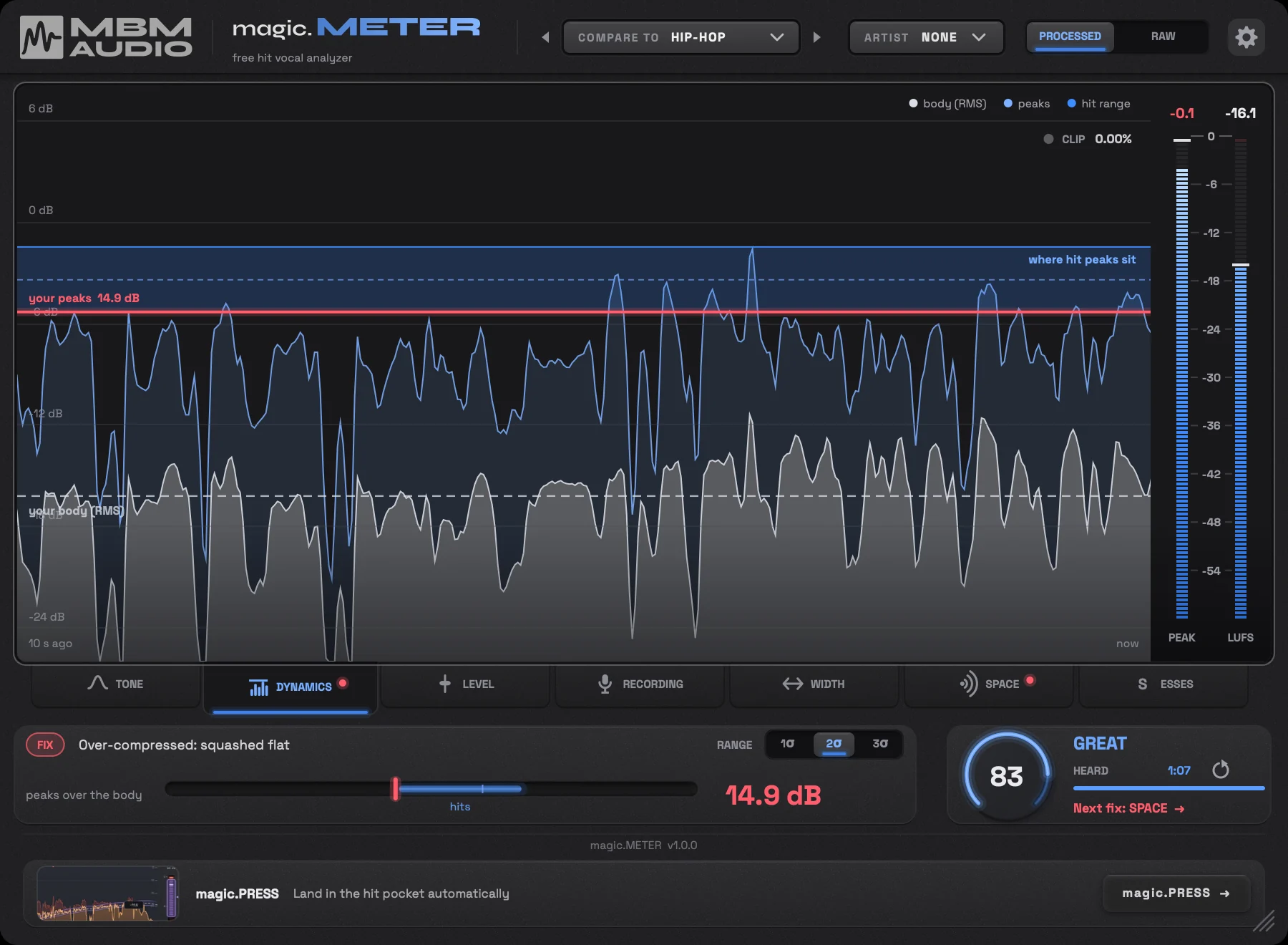
How compressed your vocal is, read as peak over body.
The hits
16.3dB
Peak over body in a hit vocal (median). 8 in 10 sit between 15.1 and 17.8 dB: a window about 3 dB wide.
Hip-hop runs more dynamic: 17.6 dB.
It tells you
Over-compressed: squashed flat
Ease off about 2 dB of gain reduction
Fix it with
magic.PRESSLEVEL
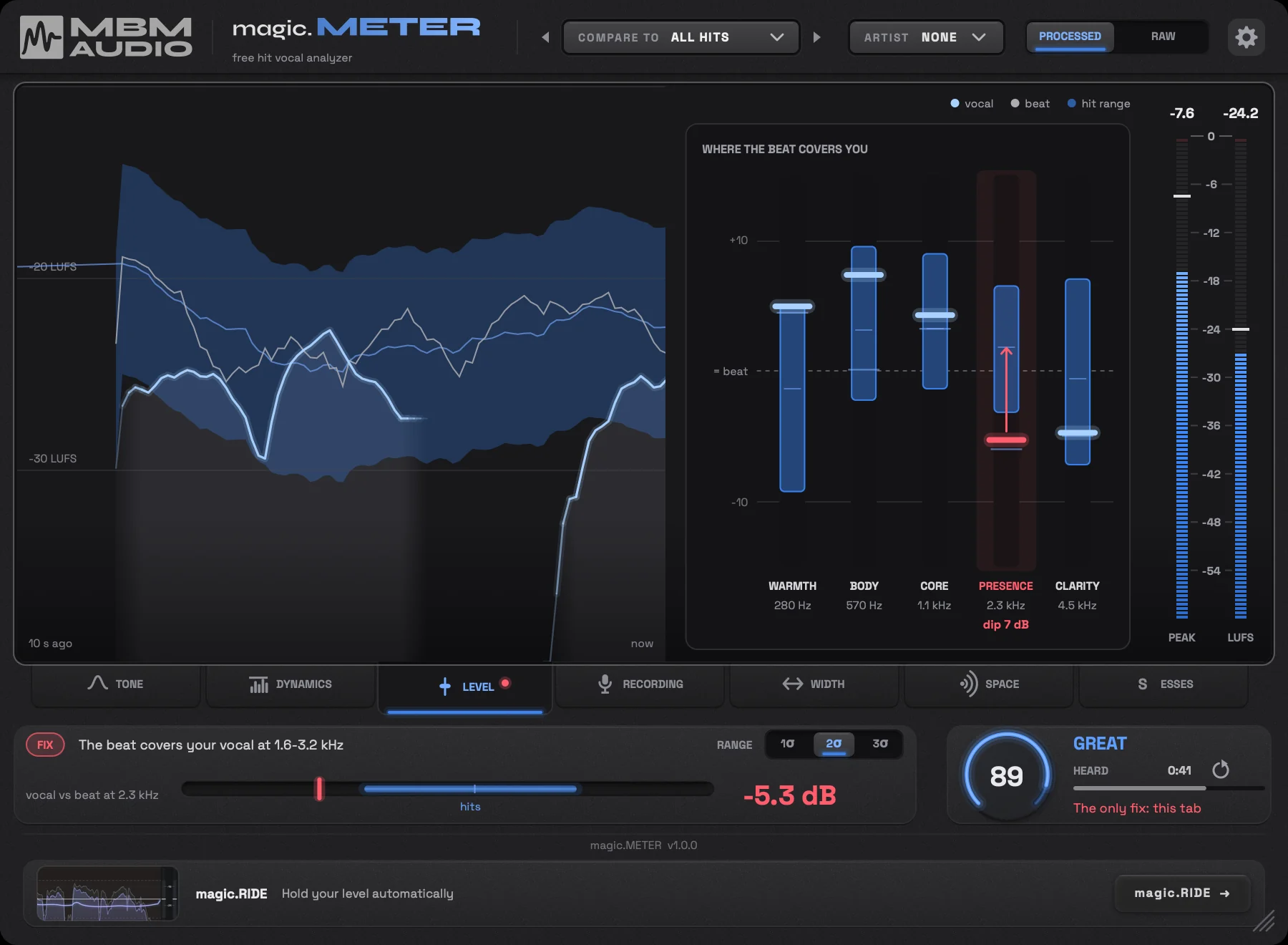
With the beat on the sidechain: how loud your vocal sits against it, and where the beat covers it.
The hits
-0.4dB
Vocal minus beat while singing (median). Hit vocals sit about as loud as their beat: 8 in 10 land between -4.1 and +3.1 dB.
Masking is read in 5 bands: warmth, body, core, presence and clarity.
It tells you
The beat covers your vocal at 1.6-3.2 kHz
Dip the beat about 7 dB around 2.3 kHz, or lift your vocal's presence there
Fix it with
magic.RIDERECORDING
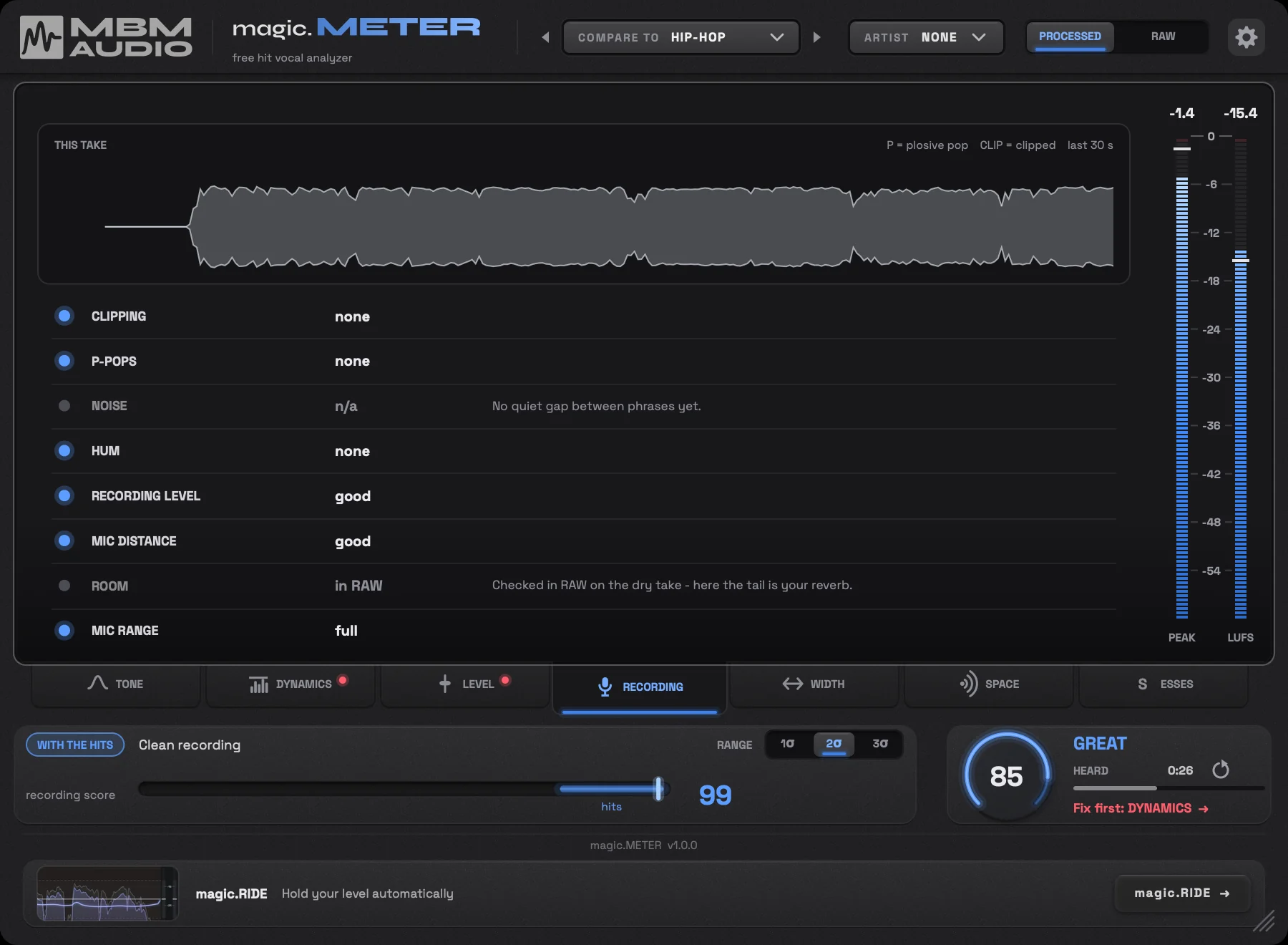
A checklist for the take. P-pops get tagged live, right where they happen.
What it checks
8checks
- Clipping
- P-pops
- Noise
- Hum
- Recording level
- Mic distance
- Room
- Mic range
Best on the raw take.
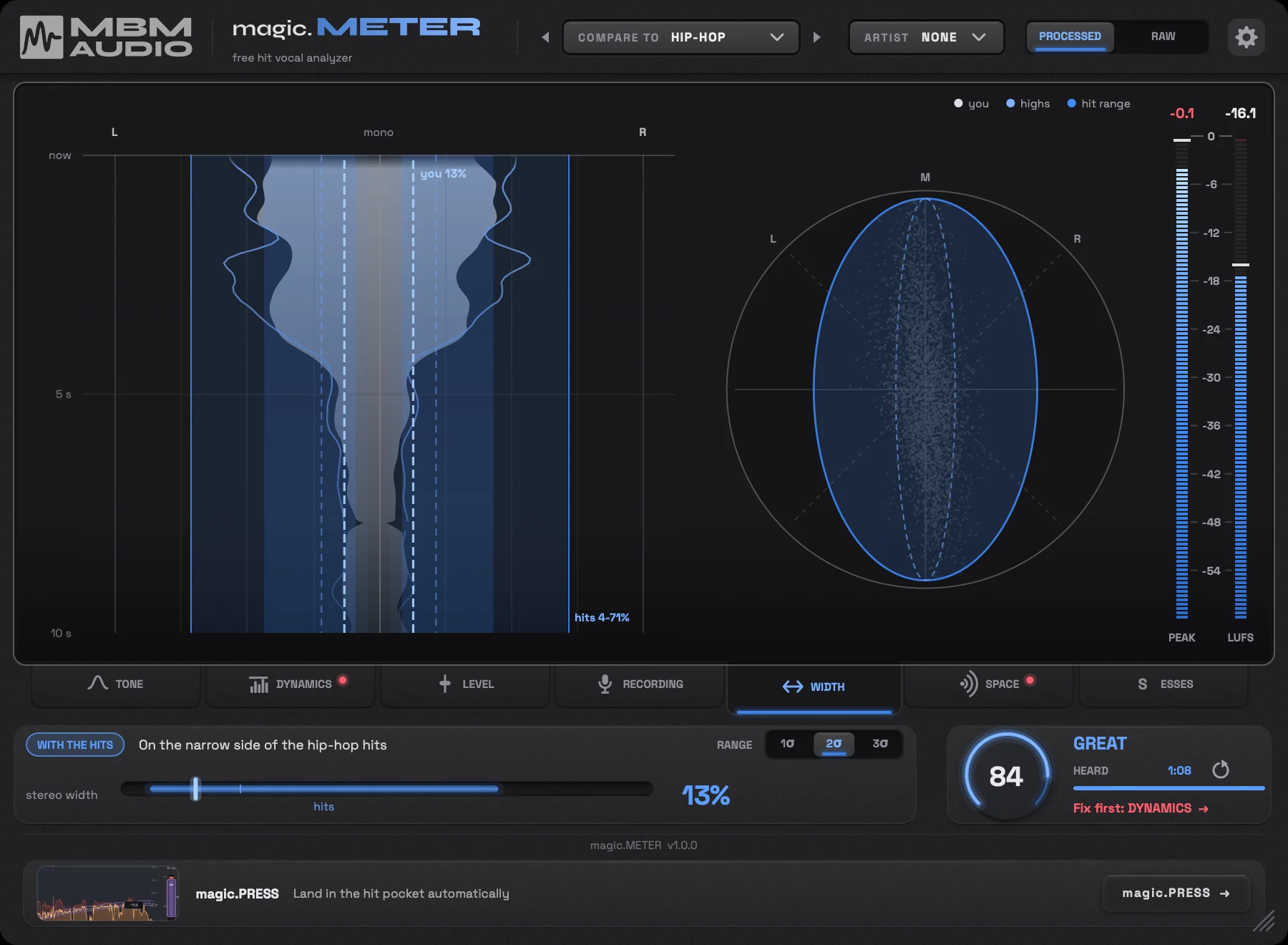
WIDTH
How wide your vocal sits in stereo.
The hits
30%
Stereo width of a hit vocal (median). 8 in 10 land between 11% and 62%: mostly centered.
Hip-hop runs narrower: 22%.
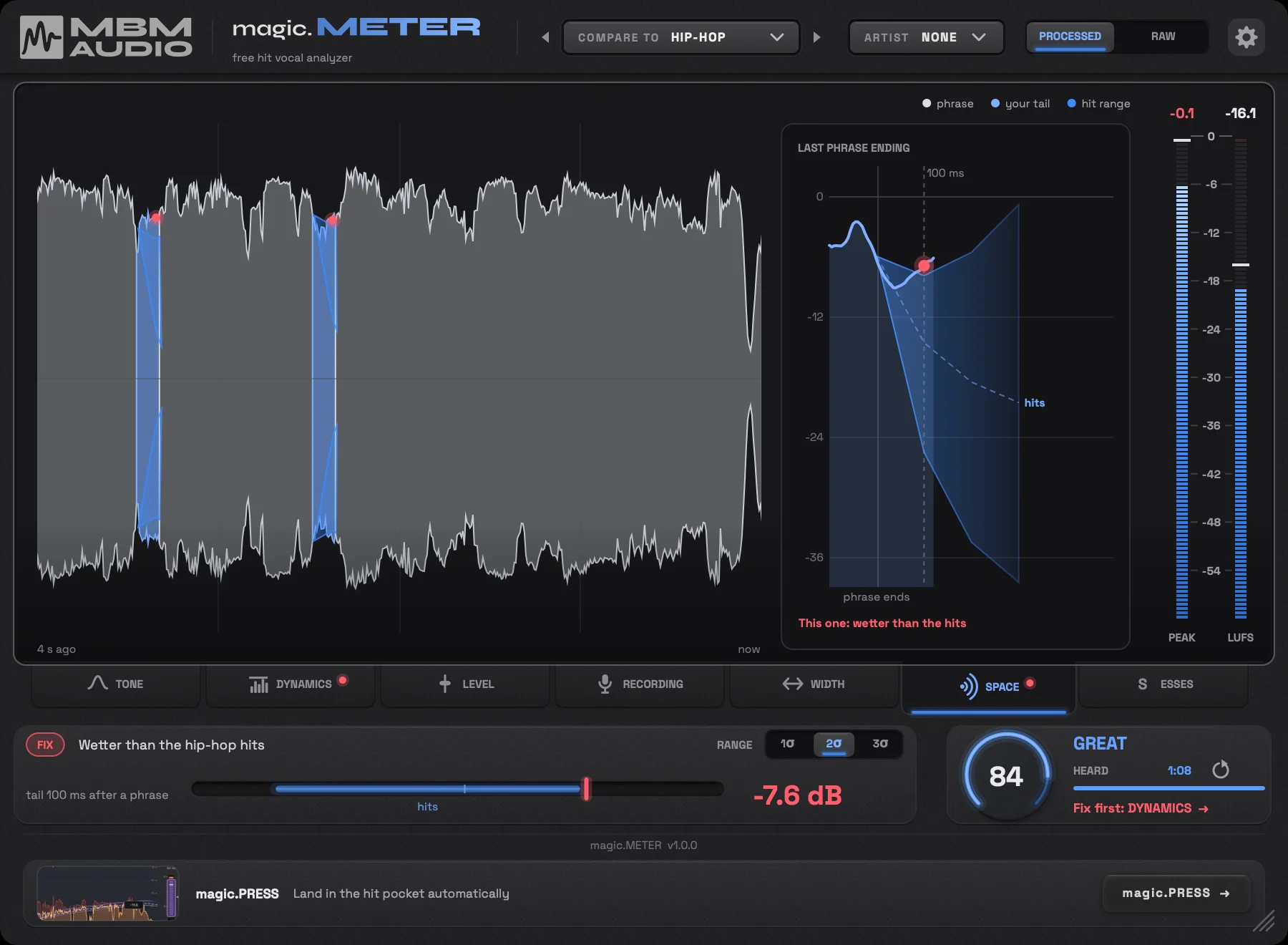
SPACE
The reverb and delay tail after each phrase.
The hits
-13dB
A hit vocal's reverb tail, 100 ms after the phrase ends (median).
It tells you
Wetter than the hip-hop hits
Turn the reverb and delay down about 7 dB
Fix it with
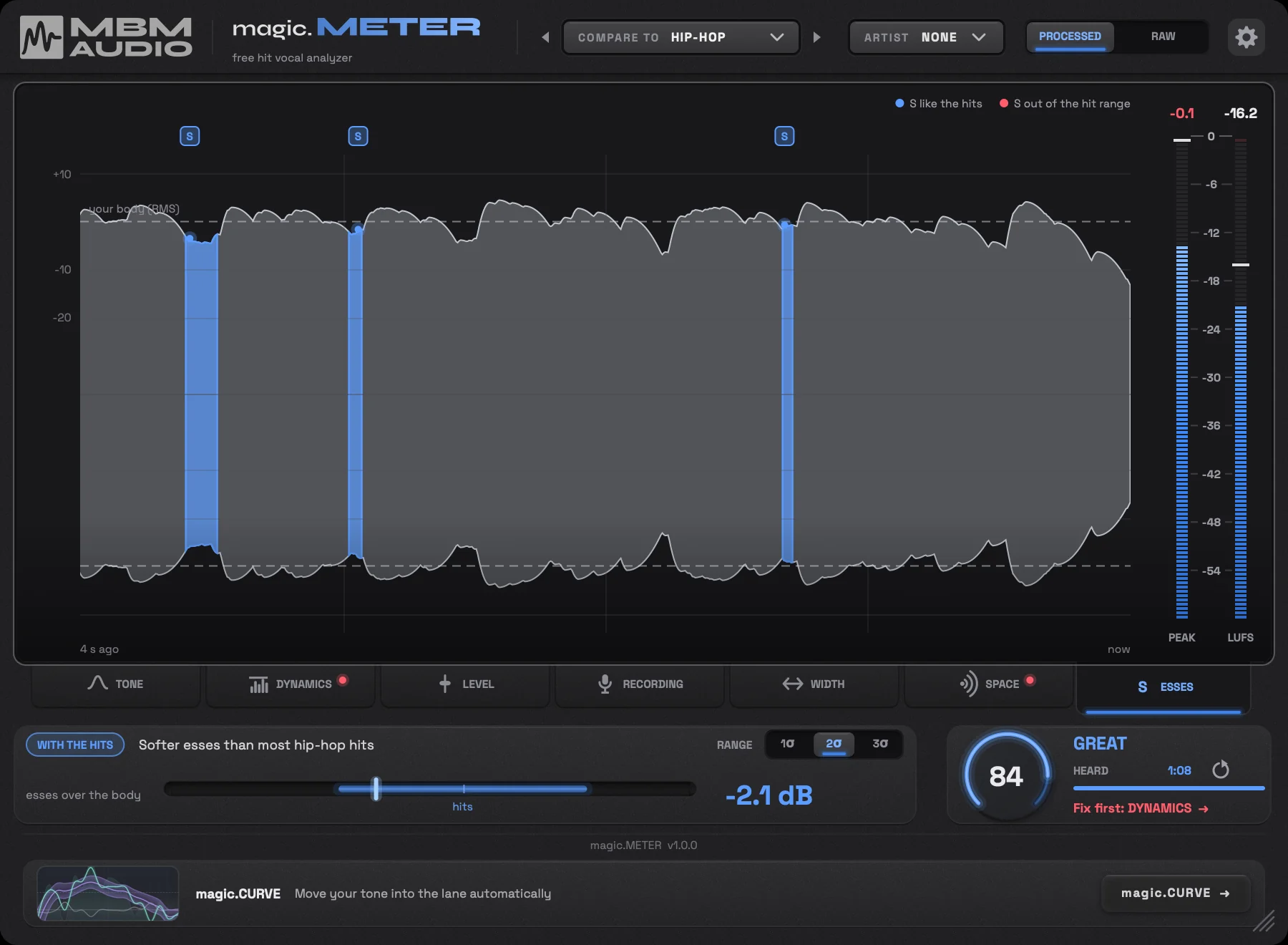
magic.PRESSESSES
How loud your esses sit against the rest of the vocal.
The hits
+0.3dB
Hit esses sit right at the vocal's body level (median).
Insert it. Press play.
- 01
Pick a mode
PROCESSED grades the vocal you're mixing. RAW checks the recording.
PROCESSED Last on the finished vocal, after your reverb and delay.
VOCAL CHAIN REVERB + DELAY magic.METERRAW First on the dry recording, to check the take and the room.
MIC magic.METER YOUR PLUGINS - 02
Send it the beat (optional)
Send the beat to the sidechain input for the level and masking checks.
BEAT magic.METER - 03
Pick what to compare to and play the song
About a minute of singing is a full read. It grades before that.
All HitsPopHip-HopR&BCountryLatinRockElectronicAlternativeChristian/GospelPlus 3 eras and 3 voice types on TONE.
Heard 1:00By then the score is within 2 points of the whole song's, 3 times in 4.
Plugin or web analyzer?
Both are free and both grade against the 3,054 hits. The web analyzer checks a bounce you upload. The plugin runs live in your session while the song plays.
| What it checks | Web analyzer | magic.METER |
|---|---|---|
| Tone (EQ) | ||
| Dynamics (compression) | ||
| Recording | ||
| Level against the beat | with the instrumental | with the beat on the sidechain |
| Where the beat covers the vocal | - | |
| Width | - | |
| Space | - | |
| Esses | - | |
| Open it |
When a tab finds something
Each tab points you to what fixes it.
What singers say about it
4.9 out of 5 from 14 ratings. Rate it
"Well, most of my vocal mixes were reading within 95-100 range in reference to magic.METER. If what I am reading is industry ideal, then this plugin confirms my vox mix are in par!"
"It said it was "essier" than everything (genre and artist) I compared it to, so I worked on that and got it so it's now only "a touch" essier, and it also said it's wetter than the typical hits, but pretty close to some artists, so I backed off the reverb a hair, but it didn't really impact it. It showed I have a clean recording, as well as good EQ. It also showed my vocals are compressed more (on this particular song, at least) than the typical hit, but pretty close to some individual artists, so I backed off the compression initially to fix the dynamics, but once it got in range, I just left it alone. This is for my song, "Girl What Can I Do?" which I have not yet scheduled for release, but plan to release it on October 30th. I hope I'll get another chance to upload some vocal clips from this song, but I want to do it after it's released. Please let me know if there's a way to do that. Thanks!"
"It's a like treasure map for vocals!"
"ボーカルの素の状態から、メーターに合わせてEQ調整したんだけど とんでもないぐらいに削る必要があった こんなにも削ると破綻するんじゃないかとおもいきや バランスが取れた音になっていて、どういうことなのか困惑しているよ… とにかくすべての要素をメーターに合わせてみたらバランスはとれている気がするからあとは、何を脚色するかは自由ってことかな"
"It really cleaned things up man. I managed to get 98 on the chain I record through with 8ms latency, so my clients hear the MAGIC from the start. Demo they leave with is basically ready to post hah. LOVE IT."
"I downloaded Magic Meter because the UI immediately looked intuitive and useful. After using it for roughly a day, I think the concept is genuinely useful, but the scoring needs some work before I would rely on it as a mixing tool. The biggest issue I ran into was inconsistent scoring. I would make a change, get a score that indicated the vocal was in a good place, and then, without changing or moving anything, the score would suddenly change. That makes it difficult to know where you actually stand or whether you're moving in the right direction. More importantly, some of the recommendations seemed to lead me in the wrong direction. For example, following the scores resulted in a vocal that sounded too thin, while the Level section indicated that the vocal was in line with the reference vocals even though, to my ears, it was obviously too quiet. If I'm going to use a tool like this to guide mixing decisions, I need to be able to trust that the measurements are consistent with what I'm hearing. That said, the workflow and UI are very good. Everything is easy to understand and navigate, and I like the overall idea of comparing your vocal against a large database of professional/hit vocals. I think there is real value in having an objective reference for things like tone, dynamics, level, width, space, and other characteristics of a vocal. If the scoring becomes more consistent and accurate, I would absolutely keep using Magic Meter. I think the underlying concept is strong enough that it could become a really useful part of a vocal mixing workflow. One improvement I'd really like to see is a more structured scoring system. I'd have an overall score, individual scores for each section, and a simple checkmark when each section is satisfactory. I'd also organize the analysis more logically in the order you'd actually mix a vocal—for example, EQ/tone first, then compression/dynamics, then level, space, width, etc. That would make it much easier to use Magic Meter as a step-by-step mixing guide rather than simply looking at a collection of scores."
"MUY BUEN MEDIDOR"
Quick questions
The short answers.
Is it free?
Yes. Enter your email at the top of this page and the download shows up right there.
Which DAWs and formats does it work in?
Mac: macOS 11 or later (Apple silicon and Intel), as AU, VST3 and AAX (Pro Tools). Windows: Windows 10 or 11 (64-bit), as VST3 and AAX (Pro Tools). For the level and masking checks, your DAW needs to be able to send the beat to a plugin's sidechain input.
Does it change my sound?
No. It only measures. It doesn't change the audio.
How long does it need to listen?
About a minute of singing is a full read. The HEARD meter shows how much singing it has heard so far, and it starts grading before it fills up.
Do I need to send it the beat?
No. But with the beat on the sidechain input it adds the level and masking checks: how loud your vocal sits against the beat, and where the beat covers it.

Why I made it
I started measuring hit vocals for my videos. 3,054 songs later, those numbers became the web analyzer, and now this: the same measurements, live on your vocal while you mix.
It's free. I hope it helps you finish songs.
Find out what to fix first
magic.METER is free. Enter your email and download it.