AutoTune Advanced vs AutoTune Pro: I Tested Them Side by Side
Antares just released AutoTune Advanced, so I ran the same vocal through it, AutoTune Pro, Melodyne and Logic's Flex Pitch at matching settings. Hear every version side by side, with or without the piano.

Key Takeaways
- AutoTune Advanced sounds like a different algorithm, but not a dramatically different one - at the same settings it's very close to AutoTune Pro
- To my ear, AutoTune Pro still sounds a little better
- Measured, the two land on the same notes at the same moments - 95% of the time within 5 cents of each other
- Melodyne sounded the most natural but takes the most hands-on work - Logic Flex Pitch was my least favorite
- No tuner knows the note you meant - sing a semitone off and it pulls you to the closest note in the key, which is often the wrong one
Antares just dropped AutoTune Advanced, and the first thing I wanted to know was simple: does it actually sound different from AutoTune Pro?
Quick name check, because it’s easy to mix up: the new plugin is called AutoTune Advanced. It’s not an update to AutoTune Pro - it’s its own plugin that sits next to AutoTune Pro 11 in the lineup.
So I ran the exact same vocal through both, at the exact same settings. And since I had the session open anyway, I threw in Logic’s Flex Pitch and Melodyne too.
Short version: they sound really similar. Advanced does sound like a slightly different algorithm, but it’s not a dramatic difference. And to my ear, the original AutoTune Pro still sounds a little better.
But don’t take my word for it yet. Here are the two AutoTunes on the same vocal, same settings, names hidden. Play both and pick the one you like.
Got your pick? Let’s get into it.
Rather watch? I made a quick reel that runs through every version. Watch it on Instagram
What AutoTune Advanced Actually Is
On paper, Advanced is built around real-time tuning. Here’s what’s new:
- A rebuilt Auto-Mode algorithm. Antares calls it its most natural and accurate pitch correction yet.
- The DVA vibrato engine. It’s patent-pending, and the idea is that it can tell a pitch mistake apart from your natural vibrato and leave the vibrato alone, even at fast retune speeds.
- Live mode with under 1 ms of latency. Antares quotes 0.84 ms at 44.1 kHz. There are also Low Latency and High Quality modes.
- Extras: a Formant Designer, Vibrato FX, MIDI Perform, and a 78-key visual keyboard.
- No Graph Mode. Note-by-note editing stays in AutoTune Pro 11.
It’s $450, or included if you’re on AutoTune Unlimited.
The way I read it, this is aimed at people tuning in real time: singing live through it, or tracking with tuning on. That matters for how you read my results, because I haven’t tested latency or the live side yet. This test is strictly about sound.
How I Set Up the Test
One vocal take, in F major, over a simple e-piano part I wrote (Logic’s Deluxe Classic).
Test 1 - fast settings:
- AutoTune Pro and AutoTune Advanced at retune speed 10
- Logic Flex Pitch at 90% pitch correction
- Melodyne: selected every note and set Correct Pitch to 90%
Test 2 - natural settings: the same take through both AutoTunes at 50 Flex-Tune and 50 Humanize.
Test 3 - a purposely bad take: the Test 1 settings again, on a vocal that’s sung sharp. More on how I made that below.
This isn’t a perfect apples-to-apples comparison. These are different programs, and Melodyne especially is built for hands-on editing, not a single “fix it” setting. But matching the settings as closely as I could gets you pretty close.
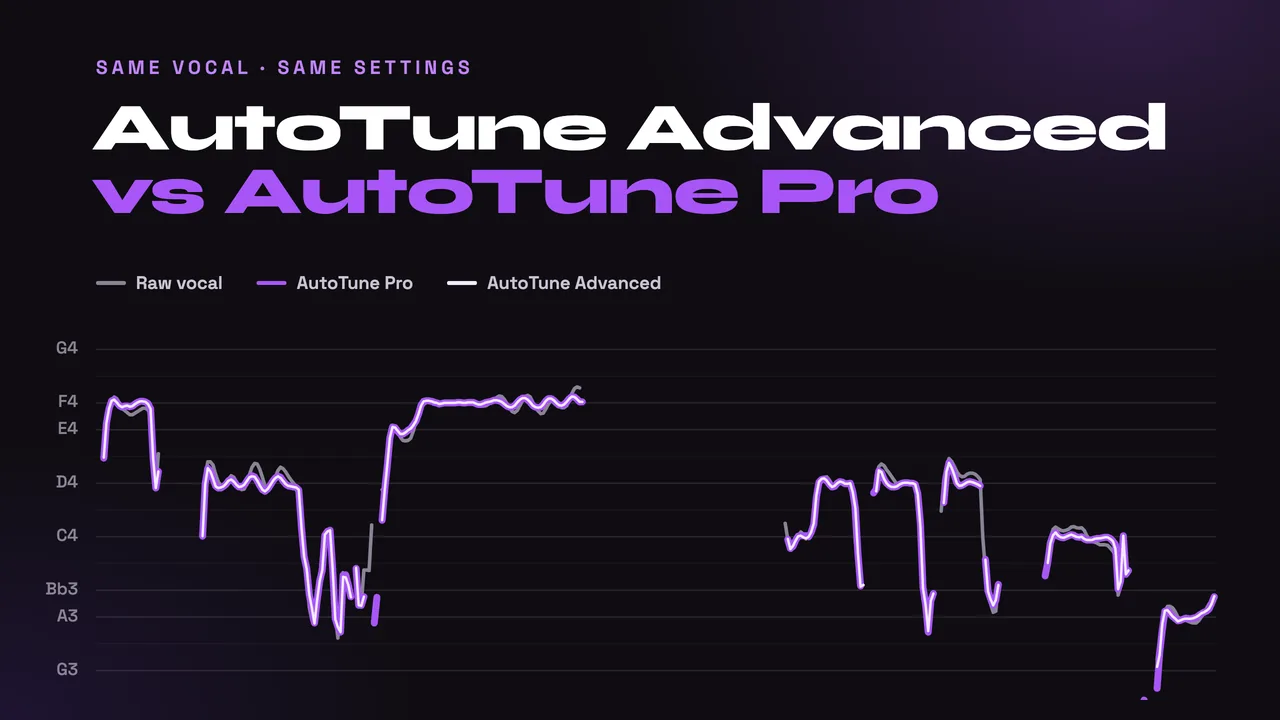
How to use the players: hit play, then click between versions. Everything’s synced, so you can switch mid-phrase without losing your place. The piano switch turns the backing on and off. The graph shows the pitch of whatever you’re hearing (purple) over the raw vocal (gray), with a line for every note in F major. Hover over it to read the exact notes, and on a computer the number keys switch versions.
Test 1: Same Take, Fast Settings
AutoTune Pro vs AutoTune Advanced
This is the comparison I cared about most, and honestly, it’s close. Advanced has a slightly different character, like a different algorithm doing the same job. But it’s not night and day, and if anything, I like Pro a little more.
I also ran every bounce through a pitch tracker (that’s where the graphs come from) to see if the numbers agree with my ears. They do. The two AutoTunes land on the same notes at the same moments. Whenever both are singing, their pitch lines are within 5 cents of each other 95% of the time. That’s a twentieth of a semitone.
So whatever difference you hear between them isn’t where the notes go. It’s the texture of the processing.
That includes the new vibrato engine. My long held note (the F in the middle) has a little natural wobble in it, and both AutoTunes smoothed out exactly the same amount of it. Maybe DVA does more on a singer with a bigger vibrato, or with its vibrato controls dialed in for it, but on this vocal at these settings, I couldn’t measure any difference.
Logic Flex Pitch and Melodyne
These two work differently. Instead of chasing your pitch moment to moment, they look at each whole note and move its center toward the right pitch. So they keep the natural movement inside each note and just nudge where the note sits.
Here’s what that looks like in numbers (100 cents = one semitone):
| Version | Average distance from the nearest note | Wobble kept on the held note |
|---|---|---|
| Raw vocal | 19 cents | 100% |
| AutoTune Pro (retune 10) | 8 cents | 57% |
| AutoTune Advanced (retune 10) | 8 cents | 57% |
| Logic Flex Pitch (90%) | 16 cents | 99% |
| Melodyne (90%) | 15 cents | 98% |
AutoTune pulls you much tighter to the note, but it takes nearly half the natural movement with it. Flex Pitch and Melodyne barely touch the movement. That’s the trade: AutoTune gets you closer to the note, the note-by-note tools keep more of the performance.
Between those two, Melodyne sounds the most natural to me. Logic’s Flex Pitch was my least favorite of the four.
Test 2: Same Take, Natural Settings
Same vocal, but with Flex-Tune at 50 and Humanize at 50 on both AutoTunes. Humanize slows the correction down on longer notes so they keep some life, and Flex-Tune lets more of your own pitch movement through instead of correcting every little deviation. This is closer to how you’d set AutoTune when you don’t want it to sound like AutoTune.
Same story as Test 1: Pro and Advanced are almost identical, within 5 cents of each other 93% of the time. Both keep more of the natural movement than they did at retune speed 10 (about 68% of the wobble on the held note, versus 57%), and they still average about 10 cents from the nearest note.
Test 3: A Purposely Bad Take
For this one I wanted a genuinely off-pitch vocal. Turns out it’s hard to sing badly on purpose - I couldn’t get far enough off pitch to really test these.
So I cheated. I moved the whole piano part up a semitone to F#, sang the part along with it, then put the song back in F major. That leaves the vocal sharp against the key the whole way through - some notes by a full semitone, some by a little less.
Same settings as Test 1: retune speed 10 on both AutoTunes, 90% on Logic and Melodyne.
This is where you learn how pitch correction actually works: it doesn’t know what note you meant. It pulls you to the closest note it’s allowed to use. Watch the graph while it plays and you can see it happen:
| The long F | The D’s | The last A | |
|---|---|---|---|
| What I meant | F | D | A |
| What I sang | F, ⅔ of a semitone high | D# | Almost a Bb |
| AutoTune Pro & Advanced | F | Flips D/E, mostly E | Bb |
| Logic Flex Pitch | F | Mostly E | Bb |
| Melodyne | F | Mostly D# | A |
The long F was sharp, but it was still closer to F than to G, so every tuner fixed it.
The D’s are the problem. In F major, a D# sits right between D and E, so AutoTune has to guess - that’s the flip-flopping you hear - and Logic mostly lands on E. Either way, it’s the wrong note.
The last A is sneakier. Sung that sharp, it’s basically a Bb, and Bb is in the key of F. As far as AutoTune and Logic can tell, I sang the right note.
AutoTune Pro and Advanced made the exact same calls at the exact same moments.
Melodyne handled it differently. It didn’t force every note into the key, so most of those D’s stayed on D#, which isn’t even in F major. But it pulled the end of the phrase back to the notes I meant, which none of the others did.
None of them turned it back into the melody I actually sang in Test 1. If your take is a semitone off, no automatic tuner is going to save it - re-sing it, or fix the notes by hand.
So Which One Should You Use?
If you already own AutoTune Pro: going by sound alone, I wouldn’t rush to switch. They’re very close, and I still slightly prefer Pro. Pro 11 also has Graph Mode for manual editing, which Advanced doesn’t.
If you tune live or while tracking: that’s what Advanced looks built for, with its under-1 ms Live mode. I still need to test that side, so I can’t tell you yet whether it’s worth it there.
If you want the most natural result and don’t mind the work: Melodyne. If I had to pick just one tool, that’s the one. It just asks more of you - you’re working note by note, not setting one knob.
If you’re in Logic and don’t want to buy anything: Flex Pitch gets the job done, but it was my least favorite of the four.
For the bigger picture, including the free options in every DAW, check out my full pitch correction plugin roundup. And if you’re in Logic, here’s how to get the most out of Flex Pitch.
Quick Answers
Is AutoTune Advanced better than AutoTune Pro?
Not for sound, in my test. At the same settings they land on the same notes at the same moments, and the tone is very close. I slightly prefer AutoTune Pro. Advanced’s selling points are its Live mode and vibrato features, and I haven’t tested the live side yet.
Does AutoTune Advanced have Graph Mode?
No. Graph Mode and note-by-note editing stay in AutoTune Pro 11.
How much is AutoTune Advanced?
$450, or included with an AutoTune Unlimited subscription.
Want a professional starting point for the rest of the chain? My Vocal Magic presets give you ready-made vocal chains for any genre, with EQ, compression, reverb and more already dialed in.
Or grab my free vocal presets to try before you buy.
About Mattie
Mattie is a music producer, songwriter, and educator specializing in Logic Pro and vocal production. With over 10 years of experience in the music industry, he's helped thousands of artists transform their home studio recordings into professional-quality tracks.
As the founder of Music By Mattie, he creates tutorials, presets, and courses that simplify complex production techniques. His mission is to make professional music production accessible to everyone, regardless of budget or experience level.